Quickstart
A quick dive into getting started with Lore
A quick dive into getting started with Lore
In this step we're going to add a "delete" link to tweets that, when clicked, will launch a dialog to delete the tweet.
You can view the finished code for this step by checking out the
dialogs.7branch of the completed project.
The dialog we'll create in this step will allow us to delete a tweet, and we'll be invoking the destroy action to do that. Assuming you have a tweet you want to delete, you invoke the action like this:
lore.actions.tweet.destroy(tweet)
The argument is the tweet you want to destroy.
If we assume the id of this tweet is 1, then invoking this action will send a DELETE request to http://localhost:1337/tweets/1.
You can learn more about the
destroyaction here.
Run this command to create a component for our delete link:
lore generate component DeleteLink
Then update the component to look like this:
import React from 'react';
import createReactClass from 'create-react-class';
import PropTypes from 'prop-types';

export default createReactClass({
  displayName: 'DeleteLink',

  propTypes: {
    tweet: PropTypes.object.isRequired
  },

  onClick() {
    const { tweet } = this.props;

    lore.dialog.show(function() {
      return lore.dialogs.tweet.destroy(tweet, {
        blueprint: 'optimistic',
        request: function(data) {
          return lore.actions.tweet.destroy(tweet).payload;
        }
      });
    });
  },

  render() {
    return (
      <a className="link" onClick={this.onClick}>
        delete
      </a>
    );
  }

});
import React from 'react';
import PropTypes from 'prop-types';

class DeleteLink extends React.Component {

  constructor(props) {
    super(props);
    this.onClick = this.onClick.bind(this);
  }

  onClick() {
    const { tweet } = this.props;

    lore.dialog.show(function() {
      return lore.dialogs.tweet.destroy(tweet, {
        blueprint: 'optimistic',
        request: function(data) {
          return lore.actions.tweet.destroy(tweet).payload;
        }
      });
    });
  }

  render() {
    return (
      <a className="link" onClick={this.onClick}>
        delete
      </a>
    );
  }

}

DeleteLink.propTypes = {
  tweet: PropTypes.object.isRequired
};

export default DeleteLink;
import React from 'react';
import PropTypes from 'prop-types';

class DeleteLink extends React.Component {

  static propTypes = {
    tweet: PropTypes.object.isRequired
  };

  constructor(props) {
    super(props);
    this.onClick = this.onClick.bind(this);
  }

  onClick() {
    const { tweet } = this.props;

    lore.dialog.show(function() {
      return lore.dialogs.tweet.destroy(tweet, {
        blueprint: 'optimistic',
        request: function(data) {
          return lore.actions.tweet.destroy(tweet).payload;
        }
      });
    });
  }

  render() {
    return (
      <a className="link" onClick={this.onClick}>
        delete
      </a>
    );
  }

}

export default DeleteLink;
In the code above, we're rendering a link with an onClick callback. When clicked, we'll show a confirmation dialog, and then invoke the destroy action when the request is confirmed.
Next we want to add the delete link to each tweet. Open the Tweet component and update the render() method to look like this:
// src/components/Tweet.js
...
import DeleteLink from './DeleteLink';
...
  render() {
    ...
    return (
      <li className="list-group-item tweet">
        <div className="image-container">
          <img
            className="img-circle avatar"
            src={user.data.avatar} />
        </div>
        <div className="content-container">
          <h4 className="list-group-item-heading title">
            {user.data.nickname}
          </h4>
          <h4 className="list-group-item-heading timestamp">
            {'- ' + timestamp}
          </h4>
          <p className="list-group-item-text text">
            {tweet.data.text}
          </p>
          <div className="tweet-actions">
            <EditLink tweet={tweet} />
            <DeleteLink tweet={tweet} />
          </div>
        </div>
      </li>
    );
  }
...
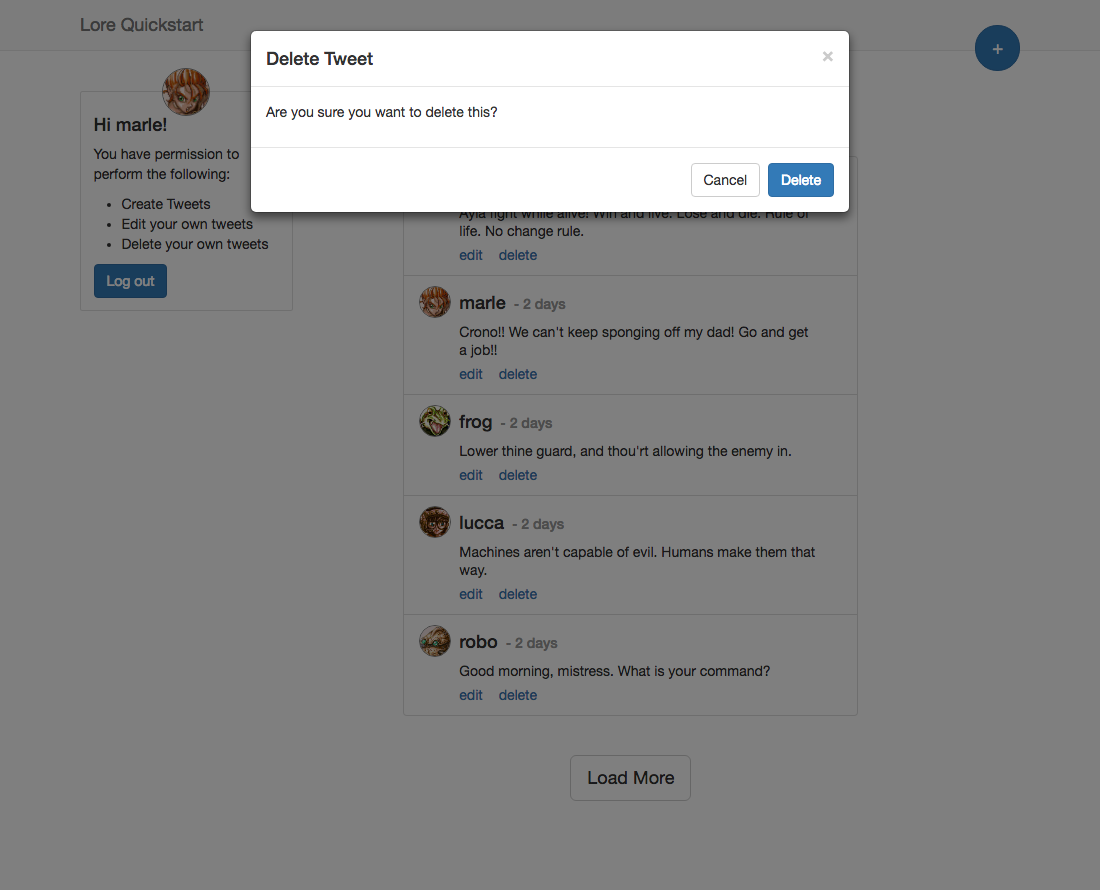
With this change in place, refresh the browser and you should see a "delete" link on each of the tweets.
If you click this link, you'll be asked to confirm that you want to delete the tweet. Once you confirm, if you look at the network requests, you'll see a DELETE request is sent to the API to delete the tweet.
The
stateof the tweet is also changed toDELETING, so if this were a real application, we could add an if statement to detect when data was being changed and modify our UI to communicate that to the user.
If everything went well, your application should now look like this.
Below is a list of files modified during this step.
import React from 'react';
import createReactClass from 'create-react-class';
import PropTypes from 'prop-types';

export default createReactClass({
  displayName: 'DeleteLink',

  propTypes: {
    tweet: PropTypes.object.isRequired
  },

  onClick() {
    const { tweet } = this.props;

    lore.dialog.show(function() {
      return lore.dialogs.tweet.destroy(tweet, {
        blueprint: 'optimistic',
        request: function(data) {
          return lore.actions.tweet.destroy(tweet).payload;
        }
      });
    });
  },

  render() {
    return (
      <a className="link" onClick={this.onClick}>
        delete
      </a>
    );
  }

});
import React from 'react';
import PropTypes from 'prop-types';

class DeleteLink extends React.Component {

  constructor(props) {
    super(props);
    this.onClick = this.onClick.bind(this);
  }

  onClick() {
    const { tweet } = this.props;

    lore.dialog.show(function() {
      return lore.dialogs.tweet.destroy(tweet, {
        blueprint: 'optimistic',
        request: function(data) {
          return lore.actions.tweet.destroy(tweet).payload;
        }
      });
    });
  }

  render() {
    return (
      <a className="link" onClick={this.onClick}>
        delete
      </a>
    );
  }

}

DeleteLink.propTypes = {
  tweet: PropTypes.object.isRequired
};

export default DeleteLink;
import React from 'react';
import PropTypes from 'prop-types';

class DeleteLink extends React.Component {

  static propTypes = {
    tweet: PropTypes.object.isRequired
  };

  constructor(props) {
    super(props);
    this.onClick = this.onClick.bind(this);
  }

  onClick() {
    const { tweet } = this.props;

    lore.dialog.show(function() {
      return lore.dialogs.tweet.destroy(tweet, {
        blueprint: 'optimistic',
        request: function(data) {
          return lore.actions.tweet.destroy(tweet).payload;
        }
      });
    });
  }

  render() {
    return (
      <a className="link" onClick={this.onClick}>
        delete
      </a>
    );
  }

}

export default DeleteLink;
import React from 'react';
import createReactClass from 'create-react-class';
import PropTypes from 'prop-types';
import moment from 'moment';
import { connect } from 'lore-hook-connect';
import EditLink from './EditLink';
import DeleteLink from './DeleteLink';

export default connect(function(getState, props) {
  const { tweet } = props;

  return {
    user: getState('user.byId', {
      id: tweet.data.user
    })
  };
})(
createReactClass({
  displayName: 'Tweet',

  propTypes: {
    tweet: PropTypes.object.isRequired,
    user: PropTypes.object.isRequired
  },

  render() {
    const { tweet, user } = this.props;
    const timestamp = moment(tweet.data.createdAt).fromNow().split(' ago')[0];

    return (
      <li className="list-group-item tweet">
        <div className="image-container">
          <img
            className="img-circle avatar"
            src={user.data.avatar} />
        </div>
        <div className="content-container">
          <h4 className="list-group-item-heading title">
            {user.data.nickname}
          </h4>
          <h4 className="list-group-item-heading timestamp">
            {'- ' + timestamp}
          </h4>
          <p className="list-group-item-text text">
            {tweet.data.text}
          </p>
          <div className="tweet-actions">
            <EditLink tweet={tweet} />
            <DeleteLink tweet={tweet} />
          </div>
        </div>
      </li>
    );
  }

})
);
import React from 'react';
import PropTypes from 'prop-types';
import moment from 'moment';
import { connect } from 'lore-hook-connect';
import EditLink from './EditLink';
import DeleteLink from './DeleteLink';

class Tweet extends React.Component {

  render() {
    const { tweet, user } = this.props;
    const timestamp = moment(tweet.data.createdAt).fromNow().split(' ago')[0];

    return (
      <li className="list-group-item tweet">
        <div className="image-container">
          <img
            className="img-circle avatar"
            src={user.data.avatar} />
        </div>
        <div className="content-container">
          <h4 className="list-group-item-heading title">
            {user.data.nickname}
          </h4>
          <h4 className="list-group-item-heading timestamp">
            {'- ' + timestamp}
          </h4>
          <p className="list-group-item-text text">
            {tweet.data.text}
          </p>
          <div className="tweet-actions">
            <EditLink tweet={tweet} />
            <DeleteLink tweet={tweet} />
          </div>
        </div>
      </li>
    );
  }

}

Tweet.propTypes = {
  tweet: PropTypes.object.isRequired,
  user: PropTypes.object.isRequired
};

export default connect(function(getState, props) {
  const tweet = props.tweet;

  return {
    user: getState('user.byId', {
      id: tweet.data.user
    })
  };
})(Tweet);
import React from 'react';
import PropTypes from 'prop-types';
import moment from 'moment';
import { connect } from 'lore-hook-connect';
import EditLink from './EditLink';
import DeleteLink from './DeleteLink';

@connect(function(getState, props) {
  const tweet = props.tweet;

  return {
    user: getState('user.byId', {
      id: tweet.data.user
    })
  };
})
class Tweet extends React.Component {

  static propTypes = {
    tweet: PropTypes.object.isRequired,
    user: PropTypes.object.isRequired
  };

  render() {
    const { tweet, user } = this.props;
    const timestamp = moment(tweet.data.createdAt).fromNow().split(' ago')[0];

    return (
      <li className="list-group-item tweet">
        <div className="image-container">
          <img
            className="img-circle avatar"
            src={user.data.avatar} />
        </div>
        <div className="content-container">
          <h4 className="list-group-item-heading title">
            {user.data.nickname}
          </h4>
          <h4 className="list-group-item-heading timestamp">
            {'- ' + timestamp}
          </h4>
          <p className="list-group-item-text text">
            {tweet.data.text}
          </p>
          <div className="tweet-actions">
            <EditLink tweet={tweet} />
            <DeleteLink tweet={tweet} />
          </div>
        </div>
      </li>
    );
  }

}

export default Tweet;
In the next section we'll be hiding the edit and delete links to reflect the application's user permissions.